
Language
1: Sign in to the Kopo Kopo Web Application
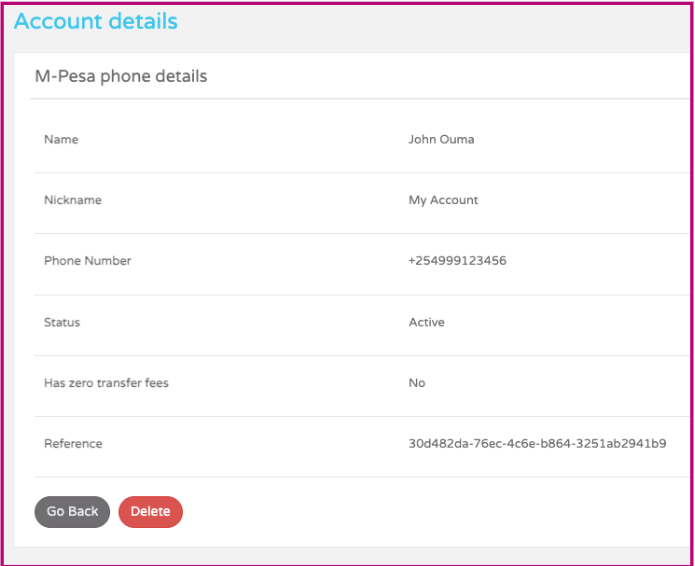
The merchant mobile wallet reference is listed alongside the other details on a merchant wallet account record.
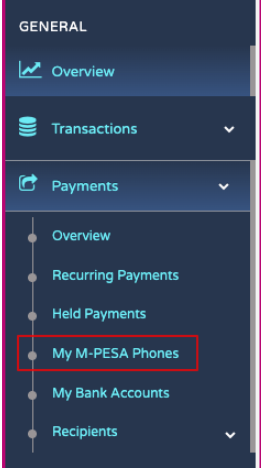
Step 1A. Click on the Payments Navigation Menu
Clicking on the payments menu displays “My M-PESA Phones”, and clicking on a specific M-PESA phone displays the show page with the API reference.
Step 1B. View a single Merchant Mobile Wallet Record
After clicking the My M-PESA phones side navigation option, a list of the merchant mobile wallet records you have created should appear. Viewing one will display the reference on the show page.
2: Use K2Connect API
- Please note that this feature has been discontinued. Login to the app to obtain the destination reference as shown above.
If a settlement account request was made through the API, a Location URL representing the request made, which can be used to identify further details of the respective settlement account.
Step 2. Obtain an application access token
Your application will exchange its client_id, client_secret, and grant_type=client_credentials for an application access token. An application access token can then be used to make calls to the API on behalf of your application.