
Language
Step 2: Create a Merchant Transfer Account
You can create merchant transfer accounts by either
- Logging into your Kopo Kopo merchant account and adding transfer accounts in the
My Bank AccountsorMy M-PESA Phonessection
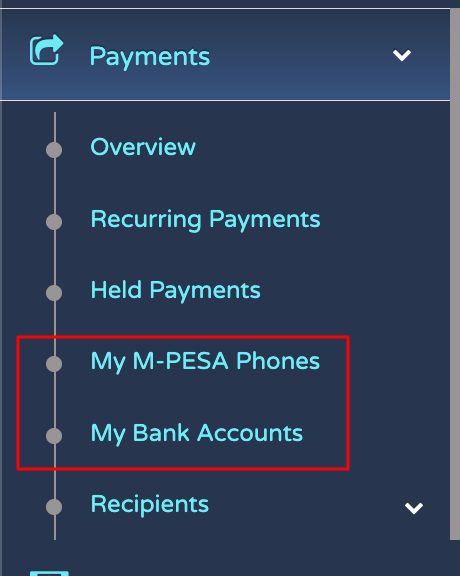
- or Via the Kopo Kopo Connect API as detailed below.
Create a Merchant Bank Account via API
We will create a merchant Bank Account
The following information is required for a Verified Bank Account. In this example we will be creating a Merchant Bank Account as a destination for your funds.
POST https://sandbox.kopokopo.com/merchant_bank_accounts
Content-Type: application/json
Accept: application/json
Authorization: Bearer 0Sn0W6kzNicvoWhDbQcVSKLRUpGjIdlPSEYyrHqrDDoRnQwE7Q
{
  "account_name": "John Doe",
  "bank_branch_ref": "c7f300c0-f1ef-4151-9bbe-005005aa3747",
  "account_number": "123456789",
  "nickname": "JD",
  "settlement_method": "EFT"
}

HTTP/1.1 201 Created
Location: https://sandbox.kopokopo.com/api/v2/merchant_bank_accounts/AB443D36-3757-44C1-A1B4-29727FB3111C
eft_bank_settlement_account = {
  type: 'merchant_bank_account',
  nickname: 'JD',
  account_name: 'John Doe',
  account_number: '123456789',
  bank_branch_ref: 'c7f300c0-f1ef-4151-9bbe-005005aa3747',
  settlement_method: "EFT"
}

rts_bank_settlement_account = {
  type: 'merchant_bank_account',
  nickname: 'JD',
  account_name: 'John Doe',
  account_number: '123456789',
  bank_branch_ref: 'c7f300c0-f1ef-4151-9bbe-005005aa3747',
  settlement_method: "RTS"
}

# Using K2Connect - https://github.com/kopokopo/k2-connect-ruby (Recommended)
settlement = K2Settlement.new('your_access_token')
# To Add an EFT bank settlement account
settlement.add_settlement_account(eft_bank_settlement_account)
# To Add an RTS bank settlement account
settlement.add_settlement_account(rts_bank_settlement_account)
settlement.location_url # => "https://sandbox.kopokopo.com/api/v2/merchant_bank_accounts/d76265cd-0951-e511-80da-0aa34a9b2388"
var requestBody = {
  'accountName': 'John Doe',
  'bankBranchRef': 'c7f300c0-f1ef-4151-9bbe-005005aa3747',
  'accountNumber': '123456789',
  'settlementMethod': 'EFT',
  'accessToken': 'myRand0mAcc3ssT0k3n'
}

//  Using Kopo Kopo Connect - https://github.com/kopokopo/k2-connect-node (Recommended)
const TransferService = K2.TransferService

TransferService
  .createMerchantBankAccount(requestBody)
  .then( response => {
    console.log(response) // => 'https://sandbox.kopokopo.com/api/v2/merchant_bank_accounts/d76265cd-0951-e511-80da-0aa34a9b2388'
  })
  .catch( error => {
    console.log(error)
  })
import k2connect

request_body = {
  "type": "merchant_bank_account",
  "account_name": "John Doe",
  "account_number": "123456789",
  "bank_branch_ref": "c7f300c0-f1ef-4151-9bbe-005005aa3747",
  "settlement_method": "EFT"  # or RTS
}

# Using Kopo Kopo Connect - https://github.com/kopokopo/kopokopo-connect-python (Recommended)
transfer_account_service = k2connect.TransferAccount(access_token=access_token)
transfer_location = transfer_account_service.add_transfer_account(request_body)
transfer_location  # => 'https://sandbox.kopokopo.com/api/v2/merchant_bank_accounts/d76265cd-0951-e511-80da-0aa34a9b2388'
<?
//  Using Kopo Kopo Connect - https://github.com/kopokopo/k2-connect-php (Recommended)
$transfer = $K2->SettlementTransferService();

$response = $transfer->createMerchantBankAccount([
    'accountName' => 'John Doe',
    'bankBranchRef' => 'c7f300c0-f1ef-4151-9bbe-005005aa3747',
    'settlementMethod' => 'EFT',
    'accountNumber' => '123456789',
    'accessToken' => 'myRand0mAcc3ssT0k3n'
]);

if($response['status'] == 'success')
{
    echo "The resource location is:" . json_encode($response['location']);
}
// Not Supported
// This feature is not currently available in the Flutter SDK.
// Please use one of the other SDKs (PHP, Ruby, Python, NodeJs) or the REST API.
When the bank account is created, you’ll receive the merchant bank account URL in the location header.
Create a Merchant Mobile Wallet via API
We will create a Mobile Wallet
The following information is required for a Verified Mobile Wallet. In this example we will be creating a Merchant Mobile Wallet as a destination of your funds.
POST https://sandbox.kopokopo.com/api/v2/merchant_wallets
Content-Type: application/json
Accept: application/json
Authorization: Bearer 0Sn0W6kzNicvoWhDbQcVSKLRUpGjIdlPSEYyrHqrDDoRnQwE7Q
{
  "first_name": "first_name",
  "last_name": "last_name",
  "nickname": "nickname",
  "phone_number": "254999999999",
  "network": "Safaricom"
}

HTTP/1.1 201 Created
Location: https://sandbox.kopokopo.com/api/v2/merchant_wallets/AB443D36-3757-44C1-A1B4-29727FB3111C
settlement_account_request = {
  type: "merchant_wallet",
  first_name: "first_name",
  last_name: "last_name",
  nickname: "nickname",
  phone_number: "254999999999",
  network: "Safaricom"
}

# Using K2Connect - https://github.com/kopokopo/k2-connect-ruby (Recommended)
settlement = K2Settlement.new('your_access_token')
settlement.add_settlement_account(settlement_account_request)
settlement.location_url # => "https://sandbox.kopokopo.com/api/v2/merchant_wallets/d76265cd-0951-e511-80da-0aa34a9b2388"
var requestBody = {
  network: 'Safaricom',
  phoneNumber: '+254999999999',
  firstName: 'first_name',
  lastName: 'last_name',
  accessToken: 'myRand0mAcc3ssT0k3n'
}

//  Using Kopo Kopo Connect - https://github.com/kopokopo/k2-connect-node (Recommended)
const TransferService = K2.TransferService

TransferService
  .createMerchantWallet(requestBody)
  .then( response => {
    console.log(response) // => 'https://sandbox.kopokopo.com/api/v2/merchant_wallets/d76265cd-0951-e511-80da-0aa34a9b2388'
  })
  .catch( error => {
    console.log(error)
  })
import k2connect

request_body = {
  "first_name": "John",
  "last_name": "Doe",
  "nickname": "JD",
  "phone_number": '+254911222538',
  "network": "Safaricom"
}

transfer_account_service = k2connect.TransferAccount(access_token=access_token)
transfer_location = transfer_account_service.add_transfer_account(request_body)
transfer_location  # => 'https://sandbox.kopokopo.com/api/v2/merchant_wallets/d76265cd-0951-e511-80da-0aa34a9b2388'
# Using Kopo Kopo Connect - https://github.com/kopokopo/kopokopo-connect-python (Recommended)
<?
//  Using Kopo Kopo Connect - https://github.com/kopokopo/k2-connect-php (Recommended)
$transfer = $K2->SettlementTransferService();

$response = $transfer->createMerchantWallet([
  'network' => 'Safaricom',
  'phoneNumber' => '+254999999999',
  'firstName' => 'Jane',
  'lastName' => 'Doe',
  'accessToken' => 'myRand0mAcc3ssT0k3n'
]);

if($response['status'] == 'success')
{
    echo "The resource location is:" . json_encode($response['location']);
}}
// Not Supported
// This feature is not currently available in the Flutter SDK.
// Please use one of the other SDKs (PHP, Ruby, Python, NodeJs) or the REST API.
When the mobile wallet is created, you’ll receive the merchant wallet URL in the location header.
© 2026 Kopo Kopo, Inc.